HTML forms
Before you start this exercise round, go to your local GitLab repository clone on your machine. There
git pull course-upstream main to fetch new content from the course upstream.
Exercise Overview
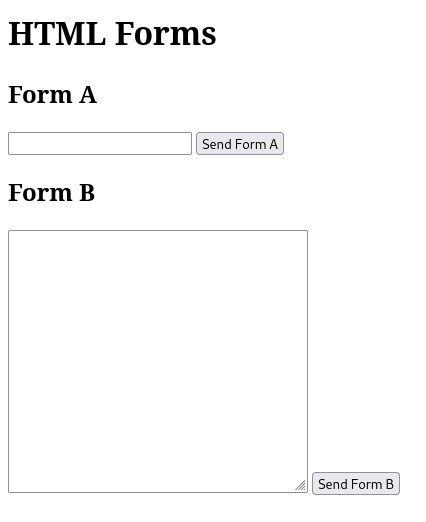
In this exercise you are going to create an HTML document that has two forms. One form must use http GET for sending its data to the server and the other form must use http POST for sending its data to the server. The HTML of your document must be valid according to The W3C Markup Validation Service.
When you open the finished document in a browser it should look like the image below.
Solving the exercise
You can find the exercise in the repository's directory exercises/01_html/ex6. So, start by making sure you are in your local clone of the Git repository, and in its
exercises/01_html/ex6 directory. Then:
- Create a new file index.html inside this directory.
- Your document should have both a title and a top level heading (h1) with the text "HTML Forms" without the quotation marks. The heading should be the first child element of the body HTML element.
- Before each form you should have a second level heading (h2) with the texts "Form A" and "Form B", respectively.
The first form should have the following properties and fields:
- HTML element form
- id: "form-a"
- method of sending data: "GET"
- URL where form sends its data: "http://localhost:3000/"
- one hidden input field with name "hidden" and value "Hello from form-a"
- one required text input with name "text"
- submit button (with
type="submit") and the following text shown on the button: "Send Form A". NOTE: Use button element for submit button on the form!
The second form should have the following properties and fields:
- HTML element form
- id: "form-b"
- method of sending data: "POST"
- URL where form sends its data: "http://localhost:3000/"
- one hidden input field with name "hidden" and value "Hello from form-b"
- one textarea with name "message" and attributes of 35 columns and 15 rows
- submit button with text: "Send Form B"NOTE: Use button element for submit button on the form!
After solving the exercise, add and commit your working repository to git using
git add <file>, git commit and git push.
Remember to commit index.html and push the changes to your Git repository
before you submit your work in Plussa.
Submitting Your Project to Plussa
PLEASE NOTE: You should copy-paste the git@.... url, not the https://... url