Lecture 12 - Async JavaScript

- AJAX security measures:

Asynchronous JavaScript
- needed to handle slow or user-initiated operations
- before ES6 callbacks were used for
- fetching data from a server (using XMLHttpRequest)
- waiting for user input (using event listeners)
- executing long-running tasks (using timers like setTimeout)
Concurrency is hard, check the chefs

- preheat the oven to 220°C
- cut the broccoli into florets
- toss with garlic, olive oil, salt
- roast for about 20-25 minutes until tender

concurrent functionality
handled by a single chef
(= i.e., single thread of the event loop in JavaScript)

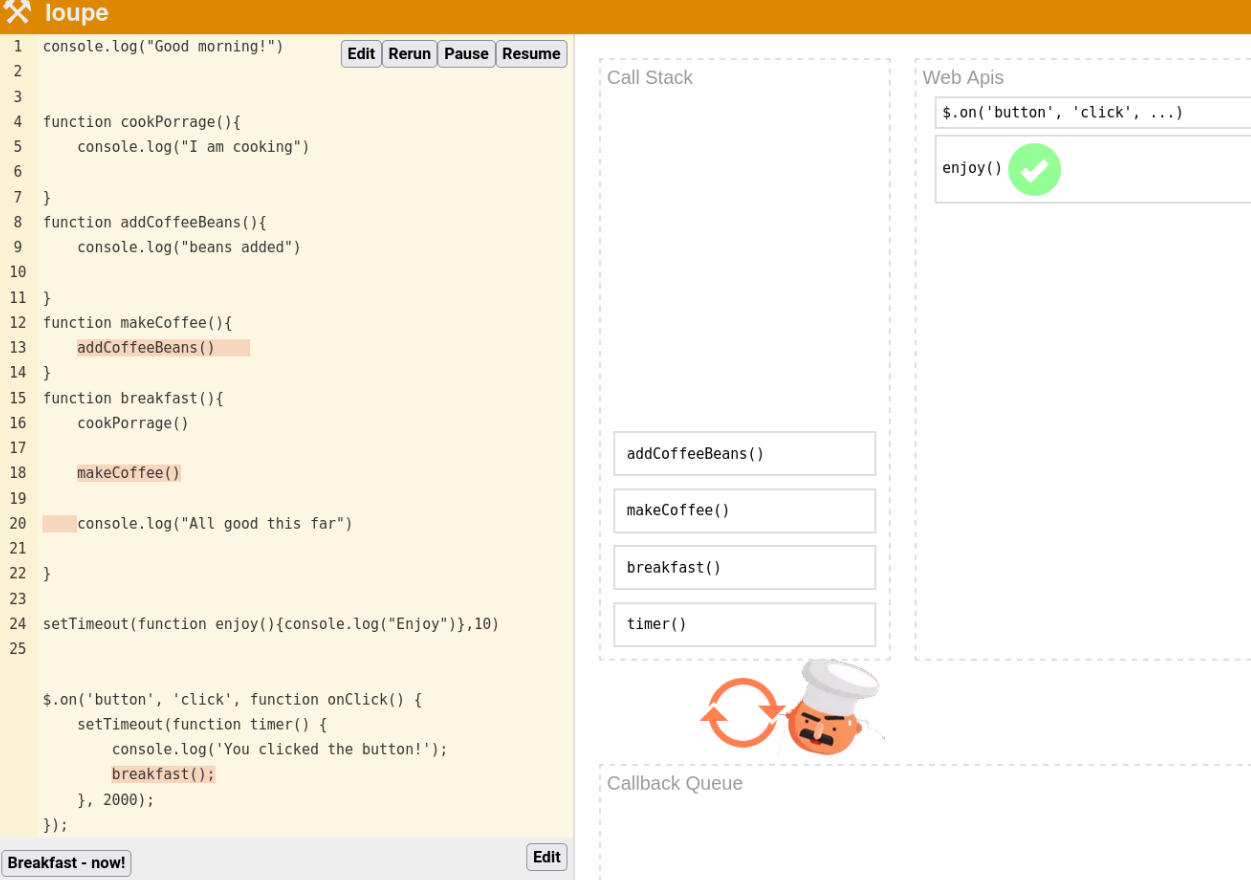
Chef Allmight, i.e., Event loop (Loupe demo)
console.log("Good morning!")

function cookPorrage(){
    console.log("I am cooking")
}
function addCoffeeBeans(){
    console.log("beans added")
}
function makeCoffee(){
    addCoffeeBeans()
}
function breakfast(){
    cookPorrage()
    makeCoffee()
    console.log("All good this far")
}

setTimeout(function enjoy(){console.log("Enjoy")},10)

$.on('button', 'click', function onClick() {
    setTimeout(function timer() {
        console.log('You clicked the button!');
        breakfast();
    }, 2000);
});
Loupe: no support for arrow functions, demo works the best with named functions
Single-Threaded Event-Driven
a programming paradigm that uses a single thread (event loop) of execution and relies on events to manage concurrency
Pros
- simpler concurrency model, avoiding complex synchronization mechanisms like semaphores, locks, and mutexes.
- elimination of race conditions, prevention of deadlocks, livelocks, and starvation
- shared state and deterministic behavior simplify reasoning about program flow
- no overhead from copying shared resources and managing thread states
Cons
- limited ability for parallel execution and context switching
- not ideal for computationally intensive operations to fully utilize multiple processors
- requires more code organization and handling of asynchronous responses
- fragmented code and error management can become more challenging due to the asynchronous nature
- synchronous operations like `alert()` or synchronous XHR requests can block the event loop and hinder responsiveness. Avoid them when possible.
Sync vs async callbacks
- map(), filter(), reduce() are executed before proceeding further
- self-defined higher-order functions
function b(){console.log("moi!")} function a(cb){cb()} a(b); - a few Web APIs come in both flavors, sync and async,
such as FileReaderSync vs. FileReader
- async recommended to to avoid blocking the main thread and maintain a responsive user experience
- Event handlers (e.g., onClick, part of DOM)
- Web APIs:
- built functions for slow ops, e.g.,
- AJAX (using XMLHttpRequest) to fetch data from servers
- File, video/audio APIs: These handle file operations and multimedia playback without blocking the main thread.
- setTimeout()
console.log("Hello");
setTimeout(console.log, 1000,"me");
console.log("it's")
AJAX with XHR
Asynchronous JavaScript and XML (AJAX)
- background communication between client and server
- updates to content without whole page refresh
- revolutionized web apps with a smoother and more responsive UX
- XMLHttpRequest (XHR) is the traditional method for AJAX communication
- the newer fetch() API is becoming more popular due to its lightweight and Promise-based approach
- payload typically JSON or XML, JSON being more popular due to its simplicity and efficiency
AJAX call made with a callback
const xhr = new XMLHttpRequest();
xhr.onreadystatechange = function () {
  // the transfer complete
  if (xhr.readyState == 4) {
    // the transfer successful
    if (xhr.status == 200) {
      // the transferred data handled here
    }
    else {
    // handle the error
    // error text in the property xhr.statusText
    }
  }
}
xhr.open("GET", url, true);
xhr.send();
XHR example in more detail
- xhr object is created
const xhr = new XMLHttpRequest(); - that provides onreadystatechange event handler triggered on state changes
xhr.onreadystatechange = handlerFunction; - a connection to a server is opened for sending a request
xhr.open('GET', url, true); xhr.send();- HTTP methods GET,
POST, and also
PUT, DELETE, HEAD, OPTIONS are allowed - url provides the HTTP address of the server
- the third parameter, boolean value (defaults to true), defines whether the request is handled asynchronously
- HTTP methods GET,
POST, and also
JSON
X in AJAX (Crockford :)
JSON has largely replaced XML
- XML resembles HTML, was thus a natural choice in the beginning
- Has schema support, namespaces ..
JSON
JSON stands for JavaScript Object Notation. It
supports two structures:
- A collection of name/value pairs. In various languages, this is realized as an object, record, struct, dictionary, hash table, keyed list, or associative array
{
  "artist":"U2",
  "timestamp":"2011-09-07 21:14:02.102805",
  "tags":[
      [ "rock", "100"],
      [ "U2", "100" ],
  ]
}- An ordered list of values. In most languages, this is realized as an array, vector, list, or sequence.
[  {"type": "joke",
  "question": "Why did the tomato turn red?",
  "answer": "Because it saw the salad dressing!",
  "category": "food"  },
  {"type": "meme",
  "title": "When you finally finish debugging your code",
  "image_url": "https://i.imgur.com/j9tegoL.jpg",
  "category": "programming"  },
  {"type": "pun",
  "text": "Reading a book about anti-gravity. It's impossible to put down!",
  "category": "science"  }]
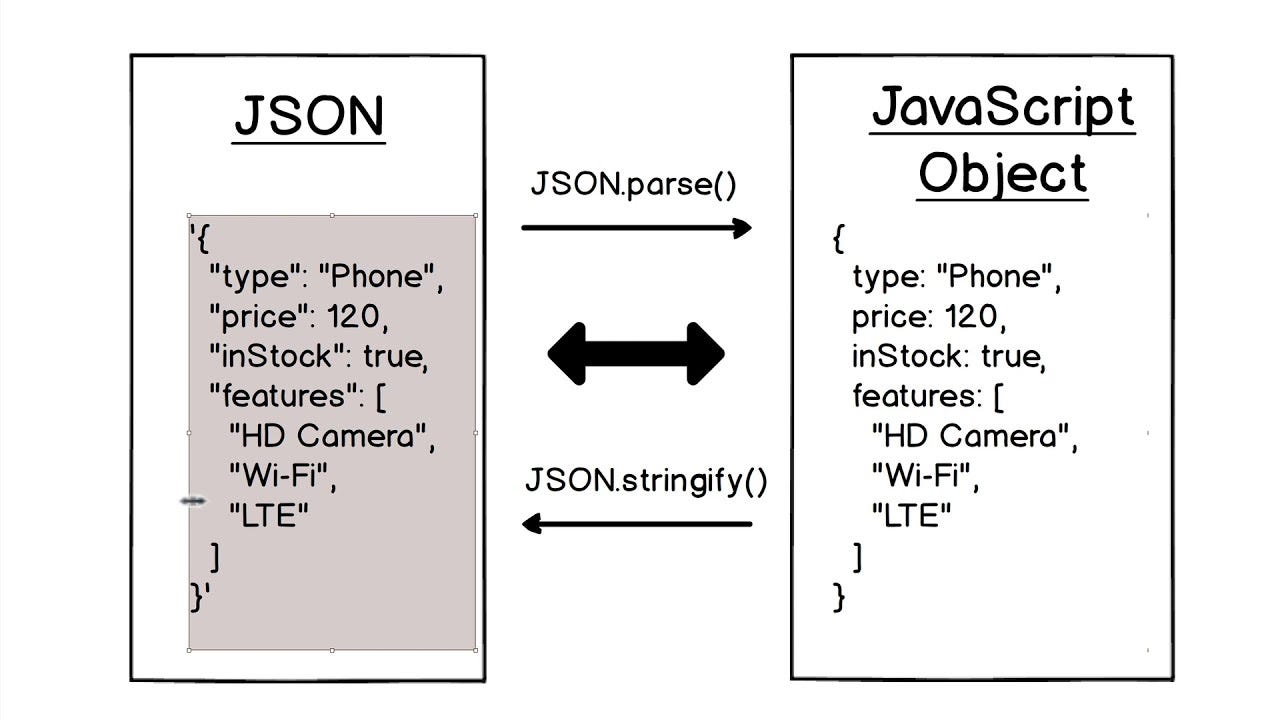
JSON string↔Object
- JSON data is transferred from server to client in a string format
- ..and converted into a JavaScript object in the browser
Promises
Promise
- represents a task that will finish at some point in the future, such as ordering food in a restaurant
- useful for handling asynchronous operations, such as fetching data from a server or reading a file
- can "resolve" with a result or "reject" with an error
- leads to code that doesn't block the main thread and handles the results of async operations in a clean and structured way
- is a monadic structure
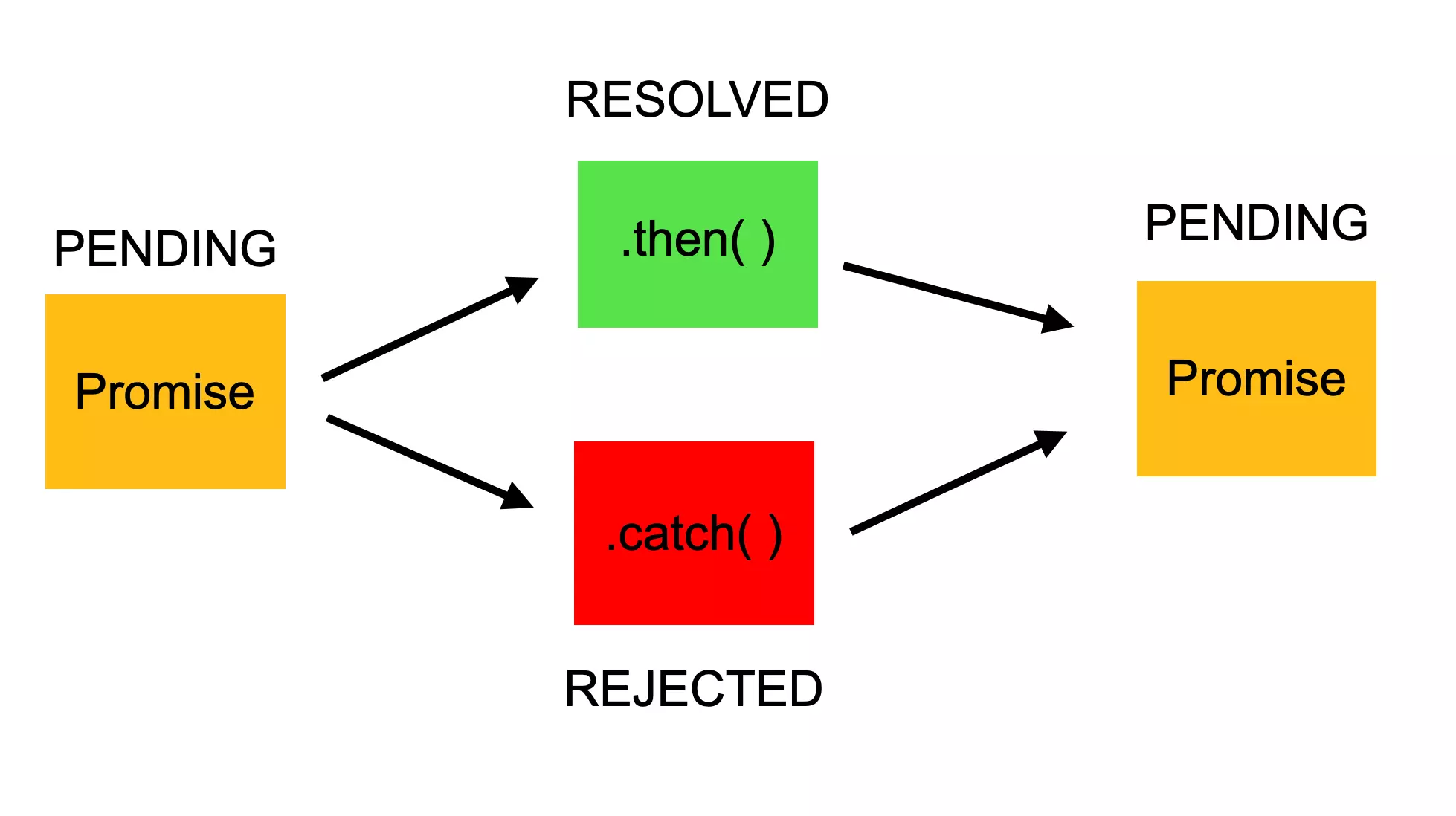
Promise with happy and sad paths
Promise with happy and sad paths
- Promise pends until it is completed, and either
- fulfilled ✅ or
- rejected ❌
Promise chain formed of then/catches that return
new Promise((✅,  ❌)=>✅)
       .then(✅[, ❌])
       .then(✅[, ❌])
       .then(✅[, ❌])
       .then(✅[, ❌])
          .catch( ❌) // == .then(null,❌)
✅ resolve()/ ❌reject()
function resolved(result){ console.log('Resolved'); return "success";}
function rejected(result) {console.error(result); return "fail";}
Promise.resolve("success").then(resolved);              //Promise { <state>: "fulfilled", <value>: "success" }
Promise.reject(new Error("fail")).then(null, rejected); //Promise {<fulfilled>: 'fail'}
Promise.reject(new Error("fail")).catch(rejected);      //Promise { <state>: "fulfilled",<value>: "fail" }
Promise.reject(new Error("fail"));                      //Promise { <state>: "rejected", <reason>:Error }
Promise.reject(new Error("fail")).
  catch(err=>console.log(err));                         //Promise { <state>: "fulfilled",
                                                        //<value>: undefined }
AJAX with fetch()
- a light-weight AJAX call that replaced older XMLHttpRequest by having cleaner API
- one mandatory argument: URL
- returns a Promise that resolves to the response
fetch("https://get.geojs.io/v1/ip/country.json")
.then(function(response) {
  return response.json();
})
.then(function(data) {
  console.log(JSON.stringify(data));
})
.catch(err=>console.log(`fetch err :${err}`));
async/await
async function (1/3)
Defined by using async keyword in a function
async function foo(){}; // as conventional f
const bar = async () => {} ; // as arrow f- Execution still differs from sync functions
- sync: chef waits beside the oven for ripe meat
- async/await: meat prepares in queue, once ready, the chef is called
async function (2/3)
- informs about anticipated slowness, such as
- AJAX, timeouts or calling other async functions
- async function must be awaited
- await pauses the function execution until a promise is resolved
- behind the syntactic sugar its implementation uses Promises
.. to end async chain (3/3)
- async mandates calling function to be async too
- ultimately async chain ends at the main level, inside <script>
- if the chain is desired to be cut earlier:
immediately invoked function expression (IIFE)(async () => { /* ... */})();
Refactored fetch with async/await
Below, the value of the first await expression is that of the resolved response, and the second, the parsed json. Parsing may take time.
const fetch = require('node-fetch');
const url ='https://jsonplaceholder.typicode.com/todos/1';
(async ()=>{                          //as IIFE
let response = await fetch(url);    //the 1st
let parsed = await response.json(); //the 2nd
console.log(parsed);
})()
Promise.all()
Promise.all()
Starts multiple Promises in parallel and waits for them all to finish.
After all the Promises are fulfilled, returns a single Promise, that contains resolved values as an array:
const proms = [1, 2, 3].map(val => Promise.resolve(val));
Promise.all(proms)
  .then(res=>console.log(res, typeof res, Array.isArray(res)));
// Array [1, 2, 3] 'object' true
However, Promise.all() rejects if any of the Promises rejects.
More here.
Promise.all() resolves Promises concurrently
Time consumption of await calls inside async block is got as a sum.
Promise.all() makes the calls concurrently, thus, the time approaches the time spent by the longest call:
fetch() example with Promise.all()
First fetching and then json parsing are done concurrently with Promise.all(). An array of Promises (fetch returns promises) is passed as an input parameter.
const url1 = 'https://jsonplaceholder.typicode.com/todos/1';
const url2 = 'https://jsonplaceholder.typicode.com/todos/2'
// Fetch data from both URLs concurrently
Promise.all([fetch(url1), fetch(url2)])
  .then(([response1, response2]) => {
    // Check for errors in each response individually
    if (!response1.ok || !response2.ok) {
      throw new Error('One or both requests failed');
    }

    // Process responses in parallel using Promise.all
    return Promise.all([response1.json(), response2.json()]);
  })
  .then(([data1, data2]) => {
    // Process the parsed JSON data directly
    console.log(JSON.stringify(data1));
    console.log(JSON.stringify(data2));
  })
  .catch(error => {
    console.error('Error:', error);
  });
The iterable is returned as a resolved value: response array. The next Promise.all() takes another array of Promises, this time the return values of json() calls. The last then() prints the stringified JSON data.
Same-Origin Policy (SOP) and
Cross-Origin Resource Sharing (CORS)
Same-Origin Policy (SOP)
- protects web applications: a security mechanism that restricts how a web page interacts with resources from other domains
- limits cross-domain requests: by default, web pages can only request resources (DOM, cookies, local storage) from the
same origin:
https://www.domain.com:443
protocol://domain:port == origin - helps isolating potentially harmful content
- doesn't involve headers: SOP is a browser enforced policy, not a communication standard. Browsers implement SOP to restrict access, separate from request/response headers
CORS
- server may configure CORS policy to explicitly allow requests from certain domains
- thus, enabling cross-domain requests as a relaxation of same-origin-policy (SOP)
- CORS in fetch API
- while CORS is primarily configured on the server,
the fetch API provides ways to interact with CORS with mode
- cors (default): this indicates a CORS request and automatically includes the Origin header. The browser will wait for a preflight request (OPTIONS method) to check CORS permissions before sending the actual request
- no-cors: this mode disables CORS entirely and does not include the Origin header, and leads to so-called opaque responses. Use case: "ping", i.e., existence-check of a resource
- while CORS is primarily configured on the server,
the fetch API provides ways to interact with CORS with mode
No CORS errors
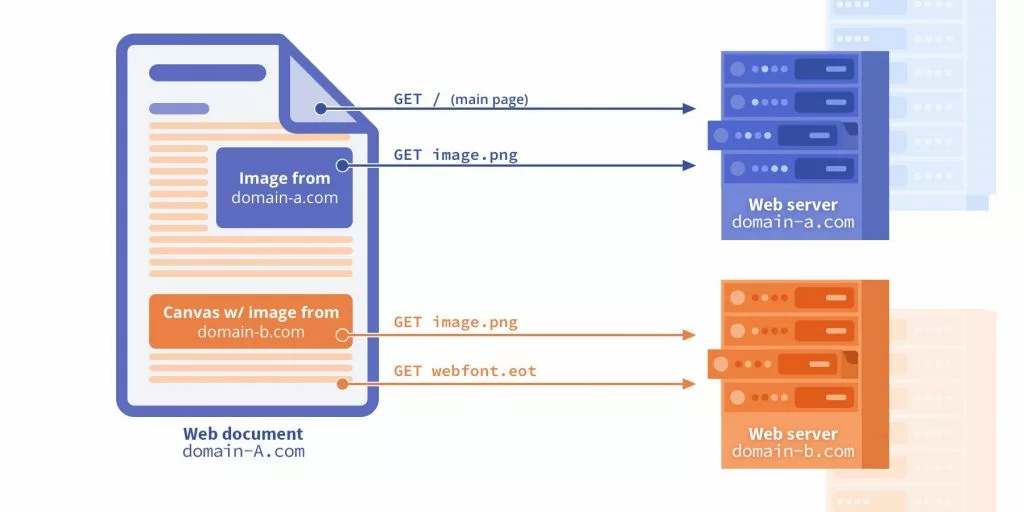
SOP OK
protocol, domain and port match
CORS OK
a server allows it, e.g., by setting Access-Control-Allow-Origin: *
CORS NOT OK
a server disallows with its Access-Control-Allow-Origin and other headers, or by providing no CORS
In case of an error, check the reason from Developer Tools: Network traffic viewer
Client-server transactions with CORS


fetch(url, {
  method: 'GET',
  headers: {
      'Content-Type':
      'application/json'
  },
  mode: 'cors'
})res.set({
// 'Access-Control-Allow-Origin': '*', //all
// 'Access-Control-Allow-Origin': 'https://m.yle.fi', //yle
'Access-Control-Allow-Origin': 'http://127.0.0.1:5500',
'Access-Control-Allow-Methods': 'GET, POST, OPTIONS',
'Access-Control-Allow-Headers': 'Content-Type'
});- If the server CORS does not allow this client, there is nothing that the client can do!
no-corsonly downgrades the request as "ping" replied by an opaque response
AJAX Security: Mitigating JS Injection
Browser's Same-Origin Policy (SOP) and tab isolation prevent cross-site data reading and cross-tab access. But SOP cannot fully prevent successful Cross-Site Scripting (XSS) attacks. In XSS, injected malicious JavaScript impersonates a user and operates with the privileges of the trusted origin.
Key to security: prevent JS injection:
- Practice code discipline: enforce
"use strict", utilize arrow functions, and embrace FP principles - Avoid dynamic code:
eval(),new Function(), andsetTimeout(string) - Favor
textContentover potentially dangerousinnerHTML/outerHTML - Crucially, escape all untrusted input (HTML, JS, CSS, URL) before rendering it
- Sanitize HTML using trusted libraries like DOMPurify before insertion
⚠️ Library Hygiene
- Use well-maintained libraries and regularly check for known security vulnerabilities.
- Keep libraries up to date.
- Avoid using external libraries when handling sensitive data.
-
Implement Subresource Integrity (SRI) for scripts loaded from CDNs:
The browser fetches the CDN script, calculates its hash, and only executes it if the calculated hash matches the<script src="..." integrity="..." crossorigin="anonymous"></script>integrityattribute.