Detecting malware
Malware often arrives via an email attachment. Such attachments pass through firewalls, and there are usually no physical security mechanisms in the way. It is sufficient that the email reaches the user and that the user is persuaded to execute the malicious code in the attachment. A similar situation exists with malware embedded in websites. These can bypass protections effectively and may even activate without user interaction.
Malware may enter directly through a vulnerability. Automated attacks are constantly running on the internet, searching for vulnerable devices. Once such a device is found, the attackers penetrate it without any active involvement of the user. IoT devices in particular have been vulnerable due to inadequate default settings and poor updateability.
Malware may come from an external device. Malware introduced via USB ports in particular has proven dangerous. Malware may be built into a connected device. For example, a charger, a fan or a USB memory stick may be designed to contain malware. This type of attack can also penetrate an air-gapped network. An example of this is the spread of the Stuxnet worm into an Iranian nuclear facility, where, likely, a USB memory stick was used to access a closed network.
Sometimes malware is already preinstalled. In such cases, the attacker has penetrated the quality assurance chain, or the product itself may have been designed to contain malicious code.
Once inside a system, malware may reside in memory, in files, lie dormant waiting for commands or programmed actions, monitor, spread, perform active operations, or update itself. All of this depends on how the malware has been designed. Malware is detected in information systems through the symptoms it causes, changes it makes, monitoring, or defensive software. Typical defensive tools include antivirus software and intrusion detection systems (IDS, Intrusion Detection System).
Everyday malware protection
For individuals, the most important tool for protecting against malware is unquestionably common sense. By avoiding opening suspicious hyperlinks or emails and refraining from downloading and executing dubious programs, one is already in a fairly good position with regard to malware protection.
However, everyone makes mistakes, for example when in a hurry or tired, so it is advisable to have some form of antivirus software installed. If you use a Windows machine and do not intend to spend money on antivirus software, the Windows Defender included in Windows 10/11 can be considered a better option than the free versions offered by other vendors. At least in that it has more features and does not constantly advertise a paid version. A complementary protective measure to antivirus software is installing a browser extension that blocks malicious sites, such as uBlock Origin (NOTE: not just uBlock).
Previously, a fairly common method of getting a victim to execute malware was to disguise it as another file type. Typically, an executable file (executable, .exe in Windows) or a command-line script (batch file, .bat in Windows) would be disguised as, for example, an image file (.jpg). Thus, malware named “malware.bat” might be renamed to something like “holidaygreeting.jpg.bat”. The problem is that in Windows, file extensions are hidden by default, meaning the victim sees the file as “holidaygreeting.jpg”. Such malware could be spread, for example, via email, as with the famous ILOVEYOU worm. Although the example worm dates back to 2000, Windows default settings still allow similar deception today. Fortunately, the security of email attachments has been improved. Instructions for showing file extensions can be found here.
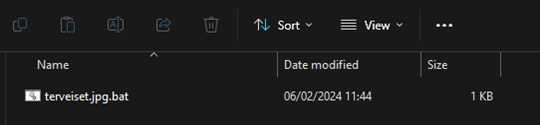
To illustrate file extensions, in the first image the file extensions are visible, meaning that the “.bat” extension immediately shows that the file is not an image.
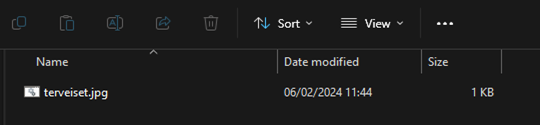
In the second image, file extensions are hidden, so only the file name is visible. “.jpg” has been added to the name to mislead those who recognise the extension as an image file.
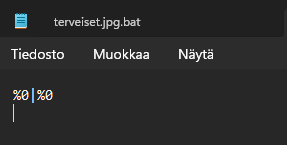
A victim clicking the file would end up with a fork bomb. It will not bring down the world, but it can bring down a computer. This particular malware operates entirely in main memory and does not as such spread to other files, meaning the computer functions normally after a reboot. Despite this, remember that distributing malware is a criminal offence.
Revealing malware attacks
Known malware can be identified using fingerprints and other static identification methods. However, this is not sufficient, as new malware is constantly being developed and previously unknown malware must also be detected. In addition to static identification, dynamic detection is therefore required.
Monitoring on the workstation and the network (advanced)
One way to identify malware is anomaly detection. An anomaly is something that deviates from the normal operation of a system. In this way, changes caused by malware can be detected, but anomalies may also be caused by something else.
An effective way to detect the effects of malware is to use fingerprints of known attacks. These refer to identifiable actions that are typical of an attack. This is called misuse detection. An example would be a program received as an email attachment attempting to delete files.
Attacks can be detected both on the workstation and on the network. These should be used together, as they complement each other. On the network, it is possible to detect issues at a network-wide level, but encrypted network traffic cannot be decrypted. On the workstation, encryption can be decrypted and analysis can reach the application level, but network-wide analysis is not possible.
Next, we consider a few examples of detecting both malware and their effects.
Spam was initially detected by analysing the content of emails and distinguishing spam from other messages. Later, network-based analysis was also developed, making it possible to identify spam based on factors such as sending volumes and sending sources. (Spam itself is not malware, but it is often sent by malware.)
Denial-of-service attacks can be detected by analysing network traffic, its intensity, content and sources. Once the source of traffic is identified, it can be blocked. Multiple sources can be identified by similarities in traffic patterns. On the other hand, advanced attacks may be difficult to detect, as traffic intensity and form may vary. (Here too, the effect is often caused by malware running elsewhere.)
Ransomware can be detected by changes affecting a large number of files. File encryption is detected by the fact that the entire file content changes.
A data breach can be detected and prevented if suspicious identifiers such as account details, passwords, etc. are observed in network traffic. Analysis tools on the workstation can be used to trace the events and effects of the attack in more detail.
Botnet malware can be traced by analysing network traffic as well as by using workstation-specific detection tools.
Security analytics based on machine learning (advanced)
Machine learning has been developed since the 1990s for the automatic detection of malware and attacks. Machine learning can be used to detect malware by providing a large number of malware samples and benign software samples as training data for an algorithm. The system learns to recognise not only the malware shown to it but also many new ones. Machine learning can also be used for dynamic detection: training data may include, for example, system calls, data flows and network traffic. Machine learning has also been used successfully to trace botnets, based on analysis of DNS names, DNS traffic and other network traffic.
Attacks against machine learning (advanced)
The general limitations of machine learning also apply to malware detection. It is important that the training data is extensive and correctly labelled. Detection can easily result in false positives and false negatives.
Malware authors have learned to evade detection, for example by including activities in malicious code that are common in ordinary software. This leads to incorrect learning: normal operations appear as malware signals. This is also referred to as data poisoning. Attackers may also reduce the aggressiveness of their code so that detection thresholds are not exceeded. For example, exfiltrated data may be sent only when there is other network traffic anyway. Attack actions may mimic the normal behaviour of the user or the system. Varying the attack or the malware also helps to mislead machine-learning-based detection, as attack patterns appear different.