Basic Concepts and Approaches
From Browsers to Applications (appification)
The mobile era can be said to have truly begun in 2007. Since then, the strong proliferation of modern mobile devices and internet connectivity has changed the way software is produced, distributed, and consumed. At the same time, the way people use computers and software has changed. In particular, the computer—PC—WWW browser is no longer the dominant way of accessing online content.
Appification describes the phenomenon in which the use of online content shifts away from the WWW platform to applications, i.e., apps. As the primary interface for web access became mobile, the number of applications grew enormously. There are apps for all kinds of use cases and application domains. Many of them resemble traditional desktop applications or versions adjusted for mobile use. However, they are often (mobile) web applications that communicate with backend services and offload computation and storage tasks to the client. The shift to applications influenced web and mobile security and created additional security challenges on the client side. The rise also affected developers. In the era preceding apps, software development was dominated mostly by experienced developers. Thanks to broader tool and framework support, entry barriers to the market are lower in application ecosystems. This attracts inexperienced developers and has negative consequences for web and mobile security on a general level.
Non‑professional application and software developers are called citizen developers. Many of them have no formal software engineering training, but they use simple application programming interfaces and tools to build applications for various platforms. The introduction of easy‑to‑use Online Application Generators (OAG) has a negative impact on the security of applications in terms of development, distribution, and maintenance. Generated applications are often vulnerable to attacks in which they are reconfigured or injected with code. In addition, they may rely on insecure infrastructure.
Web Technologies (webification)
Modern web and mobile platforms also generated another phenomenon. This is called webification. Many applications are not native applications written in compiled programming languages (Java or Kotlin and C/C++ for Android applications, or Objective‑C and Swift for iOS applications). Instead, the applications are based on scripting languages — on the server side Python, Ruby, Java, or JavaScript, and on the client side JavaScript. In addition to traditional browser‑based web applications, mobile web applications are increasingly built using these technologies. Mobile web applications in particular rely heavily on JavaScript. The following introduces, in addition to JavaScript, the fundamental technologies URL, HTTP, HTML, and CSS.
- URL Addresses
A URL, Uniform Resource Locator, is a core concept of the web. A URL address is a formatted character string that names a resource on a server and points to it. Address bars in browsers use and display URLs. An absolute URL string consists of several segments and includes all information necessary to reach a specific resource. The syntax is: scheme://credentials@host:port/resourcepath?query_parameters#fragments. Each segment has a specific meaning, and some segments are optional.
- scheme: indicates the protocol the client should use to retrieve the resource, e.g., http:, https:, and ftp: (and on a local machine, for example file:)
- // begins a hierarchical URL address as defined in RFC3986 (a URL is a special case of the URI concept defined in the RFC)
- credentials@ (optional) may contain a username and password needed to retrieve the resource
- host specifies the DNS name (e.g., tuni.fi), raw IPv4 address (e.g., 127.0.0.1), or IPv6 address (e.g., [0:0:0:0:0:0:0:1]) indicating the server hosting the resource
- :port (optional) describes a non‑default network port for establishing a connection; default ports are 80 (HTTP) and 443 (HTTPS)
- /resourcepath is the location of the resource on the server, using Unix directory semantics
- ?query_parameters (optional) conveys non‑hierarchical parameters to the resource, e.g., input to a server‑side script (“GET parameters”)
- #fragment (optional) provides instructions to the browser and contains HTML anchor elements for internal document navigation
- HTTP
HTTP (Hypertext Transfer Protocol) is the most widely used mechanism on the web for exchanging documents between servers and clients. Although HTTP is used primarily for transferring HTML documents, it can be used for any type of data. The most widely supported protocol version is HTTP/1.1, and the latest is HTTP/2.0. HTTP is a text‑based protocol that uses TCP/IP. An HTTP client initiates a session by sending an HTTP request to an HTTP server. The server returns an HTTP response containing the requested file.
The first line of the HTTP request contains the HTTP version information (e.g., HTTP/1.1). The remaining header of the request consists of zero or more name:value pairs. The pairs are separated by newline characters. Common request headers include:
- User-Agent – browser information,
- Host – URL host name,
- Accept – all supported document types,
- Content-Length – the total length of the request,
- Cookie – cookies, which will be discussed later.
The request header ends with a single blank line. HTTP clients may send any kind of content to the server; typically, however, it is HTML content, e.g., data from a form on a web page. The HTTP server responds to the request with a response header followed by the requested content. The response header contains the supported protocol version, a numeric status code, and an optional human‑readable status message. The status is used to indicate success (e.g., status 200), error conditions (e.g., status 404 or 500), or other exceptional events. Response headers may also contain cookie headers. Additional response header lines are optional. The header ends with a blank line followed by the actual content of the requested resource. As with requests, the content of the response may be of any type, but it is often an HTML document.
Although cookies were not part of the original HTTP RFC, they are now one of the most important protocol extensions. Cookies allow servers to store multiple name=value pairs in the client’s storage. Servers can set cookies by sending the response header Set-Cookie: name=value and use them by reading the client’s request header Cookie: name=value. Cookies are a common method to maintain sessions between clients and servers and to authenticate users. You may want to check out the first picture on Mozilla’s website, which illustrates the structure of an HTTP message.
HTTP is request‑response -based and suitable for one‑directional data retrieval. However, for better latency and more efficient bandwidth usage, two‑way network connections are needed. These allow the server to send data to the client at any time, not only when explicitly requested. The WebSocket protocol provides such a mechanism on top of HTTP. WebSocket connections start with a standard HTTP request containing the header Upgrade: WebSocket. Once the WebSocket handshake is complete, both parties can send data at any time without a new handshake.
- HTML
HTML (Hypertext Markup Language) is the most widely used method for creating and consuming web documents. The latest version is HTML5. The HTML syntax is fairly simple: a hierarchical tree structure of tags, name=value tag parameters, and text nodes form an HTML document. The Document Object Model (DOM) defines the logical structure of an HTML document and governs how it is accessed and manipulated. However, competing browser vendors introduced all kinds of customized features and modified the HTML language according to their preferences. Many different browser implementations resulted in only a small portion of websites on the internet complying with the HTML standard. For this reason, HTML parsing implementations and error recovery vary greatly between browsers.
HTML syntax places certain restrictions on what a parameter value or text node may contain. Some characters (e.g., angle brackets, quotation marks, and the & symbol) form the building blocks of HTML markup. Whenever they are used for other purposes, such as as part of text, they must be escaped. To avoid unwanted side effects, HTML includes an entity encoding scheme that converts symbols into HTML entities (e.g.,
<is written as<). However, if reserved characters are not encoded correctly, the result may be severe security problems, such as a Cross‑Site Scripting attack.
- CSS
- CSS (Cascading Style Sheets) is a mechanism for modifying the appearance of HTML documents. The primary goal of CSS was to provide a straightforward and simple text‑based description language to replace many vendor‑specific HTML tag parameters that led to inconsistencies. However, browser behavior also differs in CSS parsing. CSS allows HTML tags to be scaled, positioned, or decorated without the markup limitations of the original HTML. Like HTML tag values, values inside CSS can be user‑controlled or originate from outside sources, which makes CSS critically important for web security.
- JavaScript
JavaScript is a simple but powerful object‑oriented programming language for web use. It runs both in browsers and on servers as part of web applications. The language is intended to be interpreted at runtime and its syntax is inspired by C. JavaScript supports a classless object model, offers automatic garbage collection, and uses typing that is dynamic and weak. Here we focus on browser JavaScript. For each HTML document in a browser, a JavaScript execution context is assigned. All scripts within the context share the same sandbox. Cross‑context script communication is supported through browser‑specific APIs, but typically contexts are kept strictly separated. All JavaScript blocks in a context are executed one by one and in a well‑defined order. Script handling occurs in three stages:
- Parsing validates the script syntax and compiles it into a binary form. The code has no effect until parsing is complete. Blocks containing syntax errors are skipped, and the next block is parsed.
- Function resolution records all named global functions found by the parser in the block. All recorded functions are available to code that comes later.
- Execution runs all code instructions outside functions. Exceptions, however, may cause runtime errors.
Although JavaScript is a very powerful and elegant scripting language, it has introduced new challenges and security issues, such as vulnerabilities for Cross‑Site Scripting.
Application Stores
Application stores are centralized digital distribution platforms responsible for managing and distributing software in many WWW and mobile ecosystems. Examples include the Chrome Web Store for Chrome browser extensions, Apple’s AppStore for iOS applications, and Google Play for Android applications. Users can browse, download, and review mobile applications or browser extensions. Developers can upload their software to application stores, which handle all distribution challenges such as storage, bandwidth, and some advertising and sales. Before publication, most application stores require an app approval process to test reliability, ensure compliance with store policies, and screen for security issues.
If an ecosystem includes an application store, most of its software is distributed through the store. Only a small number of users download software from websites. The provider of the application store has the ability to control which applications are available — meaning certain applications can be banned. This may lead to accusations of censorship, but the introduction of security‑screening techniques has significantly reduced the number of malicious applications in stores, as well as the number of applications suffering from vulnerabilities due to misuse of security APIs. Screening techniques include static and dynamic analysis targeting application binaries and running instances of applications. In addition, application stores require applications to be signed with the developer’s or the store’s keys. In Android, application signing does not rely on the same public key infrastructures used on the web. Instead, developers are encouraged to use self‑signed certificates, and they must sign application updates with the same key to prevent malicious updates. On iOS devices, application signing requires Apple’s signature, and unsigned applications cannot be installed on iOS devices. Application stores provide developers and users with centralized access for publishing, distributing, and downloading software, and they also allow users to rate published applications. User ratings are intended to help other users make more informed download decisions, but they also have a direct connection to application security. It has been observed that user reviews related to security and privacy influence the future security‑related updates of applications.
Sandboxes in Mobile and Browser Platforms
Modern mobile and browser platforms use various sandboxing techniques to isolate applications and websites, as well as their content, from each other. This also aims to protect the platform from malicious applications and sites. Major web browsers and mobile platforms implement isolation at the operating system process level. Each application or website runs in its own process. By default, isolated processes cannot interact with each other or share resources. In browsers, site isolation acts as a second line of defense and a reinforcement of the same-origin-policy.
- Application Isolation
- Modern mobile platforms provide each application with its own sandbox running in a separate process and its own storage area in the file system. Mobile platforms use the security mechanisms of the underlying operating system to identify and isolate application resources. For example, Android’s application sandboxes are defined at the kernel level, and standard operating system features used are such as user and group IDs and security contexts. By default, the Android sandbox prevents applications from accessing each other and allows only limited access to operating system resources. Accessing protected applications and OS resources requires inter‑application communication through controlled interfaces.
- Content Isolation
Content isolation is one of the most important mechanisms for ensuring security in browsers. The main idea is to isolate documents based on their origin so that they cannot affect each other.
The Same Origin Policy (SOP) was introduced in 1995. It affects JavaScript and its interaction with a document’s DOM, network requests, and local storage (e.g., cookies). The core idea of SOP is that two separate JavaScript execution contexts may manipulate a document’s DOM only if the document host matches exactly in protocol, DNS name, and port. These three form a triplet known as the origin. Cross‑origin manipulation requests are not allowed. A major weakness of SOP is that it relies on DNS rather than IP addresses. Attackers capable of modifying a DNS record’s IP address can circumvent SOP’s security guarantees.
Because the code implementing the same origin policy sometimes contains security flaws, browsers use a second line of defense: websites are rendered in their own sandboxed processes. The purpose of sandboxed sites is to prevent attacks such as stealing cookies or stored passwords between websites.
A third method for improving web application security is the Content Security Policy (CSP) mechanism. CSP is primarily designed to prevent code‑injection attacks (such as cross‑site scripting) that exploit the browser’s trust in content sent by the web server. Excessive trust allows malicious scripts to run in the client’s browser. With CSP, web developers and server operators can restrict the number of sources the browser considers trusted (including executable code and media files). CSP can be used so that servers can globally prevent code execution on the client. To enable CSP, developers or operators can either configure the web server to send the HTTP response header Content-Security-Policy or add an HTML <meta> tag on the webpage. Compatible browsers then execute code or load media files only from trusted sources.
Permission-Dialog–Based Access Control (advanced)
Permission systems in mobile and web platforms protect user privacy by controlling access to resources. Access control in traditional computer systems was described in an earlier chapter, where it requires a precise definition of security principles and protected resources. In addition, traditional access control requires a trusted mechanism to evaluate access requests (a reference monitor) and security policies that define the appropriate behavior for all access requests. Based on these policies, the reference monitor decides whether to grant or deny access.
Modern mobile and web platforms differ in many ways from traditional computer systems with respect to access control. The main differences are listed below:
- Security Principals
- Traditional computer systems are primarily multi-user systems in which processes act on behalf of human users. Modern mobile and web environments also include, as security principals, all developers whose applications are installed on the system.
- Reference Monitor
Typically, traditional computer systems implement access control as part of the operating system. User-level processes may extend OS functionality and implement their own access control mechanisms.
Mobile and web platforms are also built on top of the low-level access control mechanisms of the operating system. Additionally, the application frameworks on which applications are developed and deployed provide extended interfaces. Web and mobile platforms use IPC mechanisms (Inter-Process Communication) to separate and isolate permissions between applications, and between applications and the OS, instead of allowing direct access to resources. Access control mechanisms apply to calling processes in order to protect IPC interfaces.
- Security Policy
In traditional computer systems, a process may have different privilege levels. It may operate as a superuser, as a system service, with user-level privileges, or with guest privileges. All processes with the same privilege level have the same rights and can access the same resources.
Mobile and web environments make a clear distinction between the system and third‑party applications: access to security‑ and privacy‑critical resources is granted only to certain processes, and third‑party applications do not by default have access to critical resources. If they need such access, they must request it from a set of permissions that is available to all third‑party applications. Most permissions in this set allow developers to use certain system processes as deputies when accessing protected sensitive resources. These system processes also act as the reference monitor and enforce access control policies.
- Permission Dialog
Mobile and web environments can distinguish between different permission levels, such as the two categories used in Android: normal permissions (e.g., access to the Internet) and dangerous permissions (e.g., access to the camera or microphone). Although applications must obtain both normal and dangerous permissions to access the corresponding resources, users see only part of this process. Normal permissions are granted without user action, but when applications request dangerous permissions, the underlying mobile or web platform presents a permission dialog to the user. Earlier Android versions showed users a list of all permissions requested by an application at installation time, but modern mobile platforms and browsers present permission dialogs during runtime. A permission dialog usually appears the first time an app requests access to a corresponding resource. Users can then either grant or deny the app access. Permission‑based access control systems allow greater flexibility and control for both developers and users.
This, however, creates responsibilities for developers and expectations for users. Although theoretically greater flexibility and control are possible, studies have found that Android developers may request more permissions than necessary. This violates the principle of least privilege. Studies also show that users often do not understand what permissions are being requested or what granting them implies. Permission dialogs are often dismissed without reading, simply to allow the application to run.
Public Key Infrastructure on the WWW and HTTPS
Secure web connections use public key infrastructure (PKI) and X.509 certificates, which allow clients and servers to authenticate each other and exchange keys for encrypted communication.
HTTPS is the most widely used secure web protocol. It runs HTTP on top of TLS (Transport Layer Security, formerly SSL). Although HTTPS offers mutual authentication between servers and clients, it is used mainly for authenticating the server. HTTPS protects HTTP traffic using TLS to prevent eavesdropping and tampering, and to prevent man‑in‑the‑middle attacks. Since HTTPS encapsulates HTTP traffic, it protects URLs, HTTP headers, cookies, and HTTP content. However, it does not encrypt IP addresses and port numbers of clients or servers. Thus, eavesdroppers may still infer information about the high-level domain names of visited websites and identify backend servers with which mobile applications communicate.
Both browsers and mobile applications authenticate HTTPS servers by validating an X.509 certificate signed by a certificate authority (CA) and verifying the server’s signature. Browsers and mobile applications include a set of preinstalled certificate authorities or rely on the CA list installed in the operating system. Typically, hundreds of CAs are included. For an HTTPS server certificate to be trusted, it must be signed by one of the preinstalled CAs.
Browsers display a warning to users when the server certificate cannot be validated. This indicates a possible man‑in‑the‑middle attack. However, common causes for such warnings include defective certificates, certificates issued for a different host name, network errors between client and server, or client-side errors such as incorrect system time. In most cases, users can click through the warning and proceed to the website even when the server certificate cannot be validated. (See ”Recent worst” at a certificate list)
Browsers use colors and icons in the address bar to indicate whether a website is secure. For example, the indicator shows insecurity in the following situations:
- Websites loaded over HTTP
- HTTPS websites that load some content (e.g., CSS or JavaScript files) over HTTP
- Loading from a site using an invalid certificate after the user has chosen to proceed anyway
HTTPS websites with a valid certificate are shown as secure. However, users of mobile applications and non‑browser applications cannot easily check whether the application uses secure HTTPS with a valid certificate, since browser‑like visual indicators are unavailable. Instead, users must rely on application developers to correctly implement HTTPS.
Authentication
Authentication is a mechanism that allows users to prove their identity to applications, which then grant or deny access to resources based on that identity. Authorization is the process by which resource permissions are predefined for each user. Authentication in general is discussed more in another chapter. Here we focus on the specific characteristics of WWW and mobile authentication.
HTTP Authentication
In the context of the WWW, “authentication” in everyday language usually refers to the server authenticating the client — that is, verifying the client’s identity by checking credentials. Before the user (or more precisely, the user operating the client program) can submit credentials, what was described earlier must already have happened: the client must authenticate the server.
The common methods for authenticating a client on the web are Basic authentication and form‑based HTTP authentication. They share the property that the credential is transmitted unencrypted and every request in the same session contains either the credential (Basic) or its session identifier (form‑based). In other words, an eavesdropper can hijack the session unless the communication is protected with encryption and message authentication. This is typically achieved by using HTTPS as a wrapper around HTTP, and HTTPS also performs the server authentication described above. Without such protection, the server may know that some authenticated client requested a resource behind access control, but even if that client is authorized, the response could go somewhere else.
In form‑based HTTP authentication, the server sends an HTML form to the website asking the client for credentials. If the form includes <input type=”password”>, the browser masks the user’s input, but this protection is only against shoulder surfing. If the credentials submitted through the form are valid, the server generates a session identifier and sends it to the client. The server then applies the same authorization rights to subsequent requests that include that identifier.
Unlike form‑based authentication, Basic authentication does not require a login page, because browsers provide a login popup dialog. Basic authentication also does not need session identifiers, because the client sends all credentials again with every request in the Authorization header. The first two messages in the diagram below show how the server can initiate authentication after receiving a client GET request by sending a response header containing the status code “HTTP 401 Unauthorised” and the field “WWW-Authenticate: Basic”. In the diagram, “Base64(Credentials)” means that the credentials are Base64‑encoded.
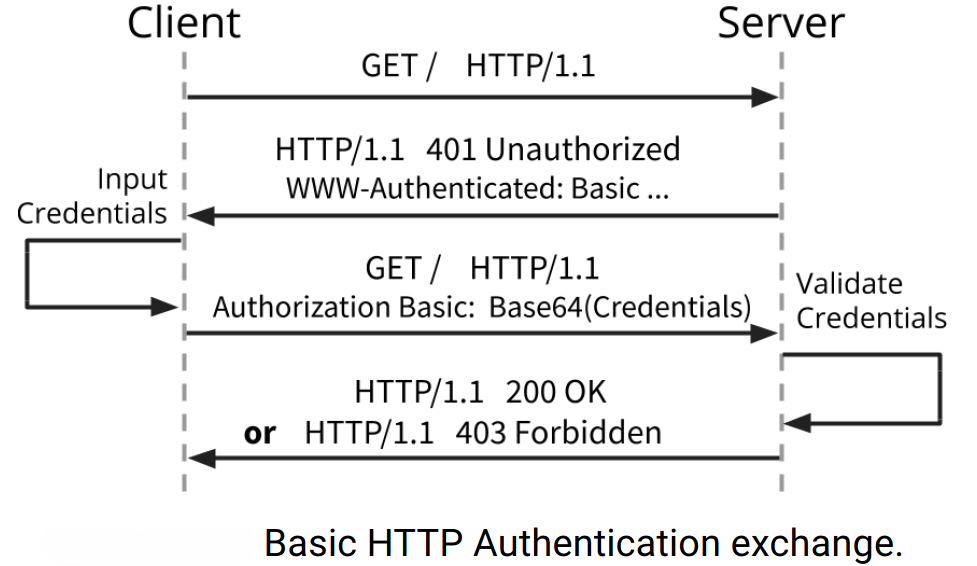
Unprotected form‑based authentication is only marginally safer than Basic authentication, because the same session identifier is not valid in a new session. In Basic authentication, all credentials are exposed in every request. Base64 is encoding, not encryption.
Authentication on Mobile Devices
Mobile devices use various authentication mechanisms to unlock devices, grant user access, and protect data from unauthorized use. The most common authentication methods on mobile devices are passwords, PIN codes, patterns, and biometric features.
Users may employ typical alphanumeric passwords that may include special characters. However, because authentication on mobile devices is frequent, many users prefer unlocking their device with numeric PIN codes. Android devices also support unlock patterns, which allow users to choose a drawing pattern on a 3x3 grid instead of a password or PIN. Biometrics such as fingerprint and facial recognition are also alternatives. These authentication methods rely on hardware security primitives, e.g., ARM TrustZone.
Cookies
Web servers associate state information with clients using HTTP cookies. Cookies related to state information are so‑called necessary cookies, which are required for a website to operate correctly. For example, the contents of an online store shopping cart are stored on the server and linked to a cookie. Login is also handled using cookies: clients and servers include their session identifier in HTTP request–response pairs, which avoids repeated authentication. This is specifically about getting in and staying in (logged-in), unlike in Basic authentication. Session cookies expire when the session is closed (e.g., when the client closes the browser), but persistent cookies expire only after a certain period.
Using persistent cookies to store session identifiers allows clients to recreate sessions without re-authentication, in a “remember me” fashion. Naturally, this requires both HTTPS and protection of the endpoint device, since an attacker who sends valid session cookies can establish a connection to the server with the victim’s authenticated privileges. Service providers may also use cookies to track users across multiple sessions. This typically compromises user privacy.
Passwords and Alternatives
Passwords are the most widely used mechanism for users to authenticate to websites and mobile applications and to protect their sensitive data. Their popularity is based on low cost, deployability, convenience, and usability. However, security suffers because passwords are used nearly everywhere. As humans often struggle to remember many different complex passwords, they tend to choose weak passwords and reuse the same password across services. Attackers can easily guess weak passwords. Reused passwords amplify the severity of all password attacks, since one compromised account can grant access to many others where the same password is used. Password guidelines used to recommend complex passwords, but requiring such complexity may actually weaken security, e.g., due to insecure storage like written notes. Password length is more important than complexity, and using passphrases can also improve memorability.
Online service providers use various countermeasures to address security problems caused by weak passwords and password reuse:
- Password Policies
- Password policies are sets of rules intended to encourage users to choose stronger passwords. Some policies also address memorability issues. To support stronger passwords, most policies regulate password length and character requirements, blacklist weak or forbidden passwords, and define password expiration intervals.
- Strength Meters
- Password strength meters serve the same purpose as password policies: helping users select stronger passwords. Strength meters typically provide visual feedback on password strength or assign a numerical score. However, studies have shown that strength meters help only to a limited extent in solving problems caused by weak or reused passwords. Additionally, different services may implement different strength meters, leading to the same password being rated differently across platforms. This may confuse users and does not necessarily help them create good passwords.
- Password Managers
- Password managers help users generate, store, and use strong passwords. They create and store strong passwords using secure random number generators and protected encryption. Password managers vary widely: locally installed applications, online services, or local hardware devices. Although they can provide more diverse and stronger passwords, their impact on overall password security is limited by usability challenges. Password managers can be difficult for typical users to adopt, and choosing from many available options can be overwhelming. After the initial setup, however, they make password management easier. Note that choosing a very strong but memorable master password is crucial, since all other passwords are protected with it.
- Multi-Factor Authentication
- Multi-factor authentication requires the user to present multiple factors during the authentication process. Website passwords are often supplemented with two-factor authentication (2FA). Typically, the second factor is a mobile device. In addition to the password, the user receives a one-time token from the mobile device for authentication.
- WebAuthn (advanced)
- The WebAuthn standard is a core component of the FIDO2 project (see FIDO Alliance), and its goal is to provide a standardized interface for authenticating users of web-based applications using public-key cryptography. WebAuthn is supported by most web browsers and mobile operating systems. It can be used for single- or multi-factor authentication and supports PIN codes, passcodes, swipe patterns, or biometric data.
- OAuth (advanced)
- Although Open Authorization (OAuth) is not an authentication mechanism, it can be used for privacy‑preserving authentication and user authorization to third-party web applications. OAuth uses tokens instead of requiring users to provide login credentials. OAuth providers issue access tokens that authorize sharing certain account information with third-party applications. Newer successors to the OAuth protocol, such as OAuth 2 and OpenID Connect, also support federated access control. Large online service providers, such as Google or Facebook, can act as identity providers, helping users reduce the number of accounts and credentials they manage. Although these protocols are intended to improve security, it has been shown that correct and secure implementation is difficult, and errors may enable impersonation attacks.