Broadly speaking, the task of access control after authentication is to check what rights a user has, ensure that the user stays within those limits, and is accountable for the use of resources. These three interwoven activities have especially in computer networks received the abbreviation AAA, from the words authentication, authorisation and accounting, which are the title of this module. Naturally, accountability is discussed from the perspective of security rather than billing or activity reporting.
This module begins with the “middle A”, that is, authorisation. In different contexts it can mean either the setting of rights (long) before authentication or the verification of rights (soon) after authentication. We adopt the first meaning in this text. The other A’s are also somewhat overloaded terms, as different sources give different emphases. This is worth remembering as you study this text, which presents the matter one particular way.
Authorisation
Access control is based on authorisation and authentication. Authorisation in turn is based on a (security) policy, that is, on what kind of security is desired — to whom one wants to grant access to what. We return to policy a little later and first define authorisation and access control.
Authorisation
The right granted to an entity (person or system) for a specific purpose, for instance access to specific parts of an information system. The information system can check what the entity is allowed to do based on its username, and this usually happens after authentication.
Access control
If one thinks in a certain way, nearly all of information security could be characterised by saying that the right and only the right people gain access to some information resource with the right intentions. On the other hand, this merely expresses what access control is about. In brief, access control concerns how the trio formed by a person, an action, and a target can be judged correct or incorrect. In reality, access control never appears this simplified. It usually requires authentication beforehand, and after the access decision there must be some mechanism that allows access for those approved and blocks it for those denied. Before all this, there must be some process that defines what kinds of accesses are right and what kinds are not. Connected to that is a “small detail”: persons and other entities must be named so that the system can make any distinction between them (that is, identify them). This whole package covers quite a large part of information security.
Access control
Procedures aimed at restricting access to an information system or data to authorised parties only.
Access control is a process during which access is either granted or denied. The process needs the following inputs:
- Who made the request?
- What is being requested?
- What rules apply when the request is processed?
The “who” can be a person, a device, a device configured in a specific way, a system, or a program, e.g. a mobile app. Technically, an access request originating from a device is made by some process, not directly by the user. Therefore the first question is really: “on whose behalf does the process make the access request?”
“What is being requested” is often a combination of an operation to be performed and the object on which the operation is performed.
Rules are logical expressions that influence the decision. In the basic case the decision is permit or deny. As policies become more precise, there may be reasons to include an indeterminate decision. The decision may also prescribe additional actions, sometimes called obligations, e.g. write a log entry.
Core concepts
The term (security) policy is used both for the general rules of an organisation determining how sensitive resources are protected and for rules directing IT systems’ use of system resources. Sometimes the terms organisational policies and automated policies are used to distinguish these. In the context of access control, policy refers to automated policies.
A subject is an entity that makes the request that is processed by access control. In this context it may be useful to distinguish the concept of a principal: for example, a user is a principal who initiates processes connected with the user identity when logging in. These processes are subjects and represent the principal. Such a distinction is not always made in the literature and is not necessary in this material. The conceptual difference is still useful to understand, for example in the next definition where only the user identity is mentioned rather than the principal.
Subjects in an information system are created e.g. when a user logs in, and can be removed e.g. when logging out. Likewise, user identities are created by some administrative action and can be ended e.g. by deleting the user account. In practice, subjects have significantly shorter lifetimes than user identities. Processes controlling industrial systems are subjects that may live forever unless the system crashes.
An object is a passive entity in an access rights request. Access operations define how a subject accesses an object. Access operations include e.g. read, write and execute rights. Operations can also be programs, such as Linux setuid programs, or entire workflows.
If distinguishing between principal and subject is necessary, then instead of access operations, the principal has access rights. Normally the distinction is not needed, so access rights and permitted operations can be equated. The term permission is also often used as a synonym for access right.
In some contexts, access rights are called privileges. This happens e.g. in operating systems (which also have privileged processes) and in the principle of least privileges. Oracle9i Database Concepts Release 2, for example, says: “A privilege is the right to use a named object in a specified manner …”.
Some operating systems, e.g. Windows, distinguish access rights from privileges. Privileges are then rights to use system resources and perform system-related tasks (as opposed to e.g. manipulating the user’s own files). Operating systems and databases also often have various system privileges needed for system administration.
A reference monitor is a component that makes decisions on access requests according to applicable policies.
Automated policies
Automated policies are collections of rules that determine the subject’s access to an object. A policy can be expressed, for example, as an access control matrix, where subjects index rows and objects index columns. Access control lists stored with objects correspond to matrix columns, and capabilities stored with subjects correspond to matrix rows.
| kissa.jpg | paint.exe | lista.txt | |
|---|---|---|---|
| Harri | read | no rights | read/write |
| Marko | read | execute | no rights |
| Linnea | read/write | execute | read/write |
Above is an example of an access control matrix. The subjects are Harri, Marko and Linnea. The objects are the files kissa.jpg, paint.exe and lista.txt.
A drawback of the access control matrix is that as the number of subjects and objects grows, the matrices become large and difficult to maintain. Considering the matrix helps to distinguish the concepts of subject and principal: The matrix does not show transient subjects but permanent principals. Usually there is no harm calling them subjects as well.
Role-based access control
Role-based access control (RBAC) uses roles as an intermediate layer between users and the authorisations for certain actions. The actions may relate to built‑in integrity checks mediating access to objects. Users are assigned roles and are authorised to perform the operations associated with their active role.
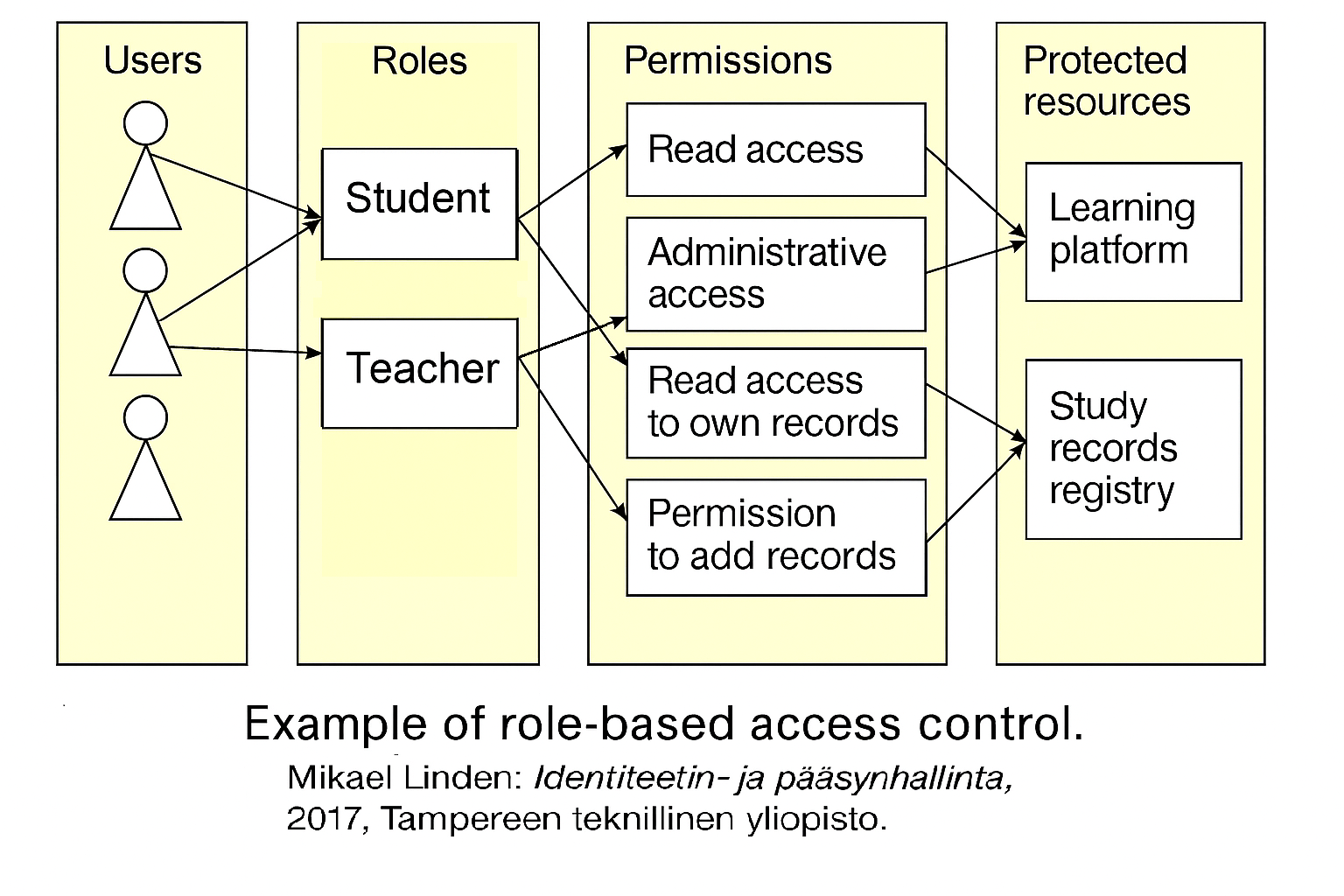
In the figure, users are associated with roles (student, teacher), and roles are associated with different authorisations (read rights, administrative rights, etc.). The authorisations relate to objects (learning platform, student record system). For example, the user Olli Student can read the learning platform, but the user Oili Teacher can administer it.
Separation of duties (SoD) refers to practices preventing individual users from becoming too powerful. For example, an old financial rule says that cash handling and bookkeeping should not be in the same hands. Examples of SoD include rules according to which:
- more than one user must participate in performing a certain transaction;
- a user authorised to carry out a certain sequence of events may not perform some other events;
- administrators of policies may not assign permissions to themselves.
Static SoD rules are taken into account when defining a user’s roles, while dynamic SoD takes effect when a role is activated.
A drawback of RBAC is that it can become quite messy over time, since roles require continuous maintenance. One must consider whether overlapping roles have appeared or whether a role has become obsolete and should be removed. RBAC works well as long as each user has only one role. Deploying RBAC requires significant effort in designing the role structure and populating role data.
Attribute-based access control (advanced)
To the subject, object, requested operations, and in some cases the environment (time, place, device, etc.), one may attach attributes, which are more fine‑grained than in ordinary access control.
When policies and other rules define permitted operations in relation to such attributes, this is attribute‑based access control (ABAC). Both conventional and role‑based access control are special cases of this, and for example “roles” can also be assigned to systems, programs, devices, etc.
ABAC can be performed inside the application or in supporting infrastructure. In the former case, ABAC can use application‑specific attributes and operations.
Code-based access control (advanced)
Code-based access control (CBAC) defines access rights for executable files. Policies may refer to the origin of the code, to the code’s identity (e.g. the hash of an executable), or to other properties of the file instead of referring to the user who launched the file. The origin can include the domain from which the code was obtained, the identity of the signer, and a particular name space. CBAC appears in the Java security model and Microsoft’s .NET architecture. In CBAC, the reference monitor typically performs a stack walk to verify that all calls on the stack have been granted the required permissions.
Mobile security (advanced)
Smartphones usually have a single owner, contain private user data, offer communication features from calls to NFC, can monitor the environment with cameras and microphones, and determine location e.g. via GPS. In smartphones, applications are the subjects of access control. Objects are sensitive data stored on the phone and sensitive phone functions.
Smartphone access control meets the user’s privacy requirements and the platform’s integrity requirements. For example, Android divides permissions into normal, dangerous, and signature permissions. Normal permissions do not pose privacy or platform integrity concerns and apps do not need approval when requesting them. Dangerous permissions may affect privacy and require user approval. Before Android 6.0, users had to decide permissions when installing the app. Studies showed that permissions were granted too easily because users were unaware of the risks and did not understand what they were doing. Android 6.0 (in 2015) introduced runtime permissions, under which users are prompted to grant dangerous permissions when they are first needed during app execution. Signature permissions affect platform integrity and can be used only by apps authorised by the platform provider. Both the app and the permission must be signed with the same private key.
Digital rights management
Digital rights management (DRM) originated in the entertainment industry. Unrestricted copying of digital content (e.g. games, movies or music) would weaken the business of content creators and distributors. Therefore it is in their interest to influence how content is available and how it can be used on customers’ devices. DRM mechanisms may regulate e.g. how many times content can be used, how long it may be previewed for free, the number of devices allowed for use, or content pricing.
DRM turns access control upside‑down because it applies an external party’s policy to the system owner, rather than protecting the system owner from external parties. Superdistribution allows information to be freely shared in protected containers. Containers include labels indicating the usage conditions. Data can only be used on machines with an appropriate reader, a superdistribution label reader. The reader can open the container, track (and report) usage, and enforce usage conditions. Finding such tamper‑resistant enforcement mechanisms for DRM was one of the driving forces behind trusted computing.
The required level of tamper resistance depends on the expected threats. TPM modules (trusted platform module) provide a high‑assurance hardware solution. Intel SGX enclaves provide a system‑software solution. Document readers that prevent copying implement tamper resistance in software. A sticky policy means that an access control policy associated with an object travels with the object. For example, if a patient’s data (object) moves among several healthcare units, a sticky policy ensures that access to the patient’s data occurs according to the same policy everywhere, because the policy is attached to the data.
Attestation provides trustworthy information about the platform configuration. Direct anonymous attestation achieves this while protecting user privacy. Remote attestation can be used when the policy depends on programs running on a remote machine. A content owner can, for example, check the software configuration of the target machine before allowing content to be delivered to it. (Attestation also appears in the hardening of operating systems.)
Usage control
Usage control (UCON) has been proposed as a framework for authorisations based on subject and object attributes, obligations and conditions. Obligations are additional actions that a user must perform to obtain access, e.g. clicking a link to accept terms of use. Obligations may also be actions the system must perform, e.g. logging access requests. These actions may need to be performed before access, during access, or after access.
Conditions are independent of subject and object, e.g. the time of day in case a policy allows access only during business hours, or the location of the machine making the request. Examples of the latter include policies allowing certain requests only when sent from the system console (allowing access only from machines on the local network), or policies taking into account the country of the IP address accompanying the request. Many UCON concepts have been adopted in the XACML 3.0 standard.
Usage control may also include rules about what happens after an object has been used, e.g. a document may be readable but its contents cannot be copied. Rules may also concern how attribute properties may be changed after access is permitted, e.g. a news site may decrement the visitor’s counter of remaining free articles. One can also think that “traditional” access control handles basic access operations at the infrastructure level, whereas usage control concerns whole workflows at the application level. In telecommunications services, usage control may impose limits on traffic volume.
Deployment of access control
Once the access control policy has been defined, it deployment requires creating the locations where each access request is handled and decided whether it complies with the policy. Permission may not necessarily be granted based solely on the request, but additional information from other sources may be needed (for example, just from a clock). Finally, the decision must be communicated to the component that manages the requested resource. In XACML terminology, deployment requires:
- policy administration points, where policies are set;
- policy decision points;
- policy information points, from which additional input for the decision algorithm may be obtained; and
- policy enforcement points, which implement the decision.
These are illustrated in a diagram, which combines the XACML and SAML standards. Information points are, however, distributed. XACML is the eXtensible Access Control Markup Language, and SAML is the Security Assertion Markup Language. Both are based on XML. They are needed only in later courses.
Delegation and revocation
Both terms, delegation and granting refer to situations where a subject receives an access right from someone else. If a difference is made, then granting would mean the original authorisation by a policy and delegation would give short‑lived access rights for the duration of some process, given by another subject. For example, XACML distinguishes policy administration from dynamic delegation, noting that the latter allows some users to create policies of limited duration for granting specific capabilities to others (so, policy is a tool here, as well).
Rights are not always granted indefinitely — even if we are talking about system‑level policy administration rather than delegation. For example, a grantor may set an expiration date, a right may be valid only for a session, or there may be a revocation mechanism, such as the Online Certificate Status Protocol (OCSP) for X.509 certificates (more on certificates). All major browsers support OCSP. Revocation lists are used when the check cannot be made over the network and when it is known in advance where the granted right will be used.
Reference monitor (advanced)
In its original meaning, the reference monitor was an abstract machine mediating all accesses by subjects to objects. The security kernel was the trustworthy implementation of the reference monitor. The Trusted Computing Base (TCB) was the totality of protection mechanisms in a computer system responsible for enforcing the security policy. Since then, the interpretation of these concepts has changed somewhat. In modern operating systems, the reference monitor (e.g. the Windows Security Reference Monitor) is not an abstraction but an implementation, and TCB may also refer to the same limited function rather than the entire set of protection mechanisms.
The reference monitor has two tasks:
- It authenticates (verifies) all evidence provided by the subject with the access request.
- It evaluates the access request against the policy.
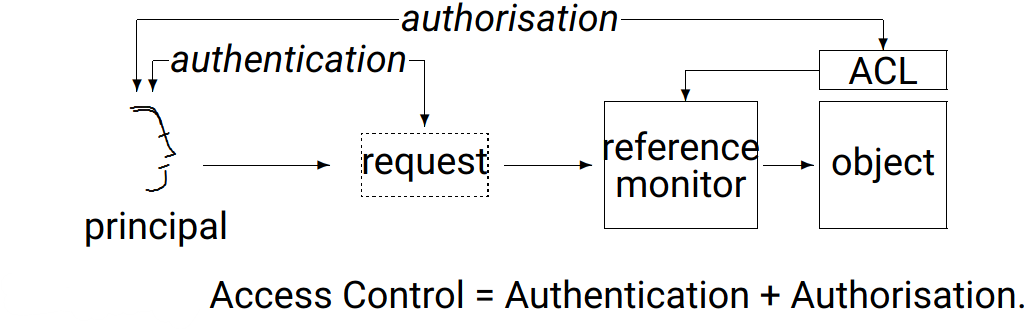
The figure shows the position of the reference monitor in access control as it was interpreted already in operating‑system research in the 1990s. Note that authorisation influences two points, as stated at the beginning of this module. On the left is the authorised subject and the authorised access request to the object.
The reference monitor’s decision algorithm must identify the applicable policies and rules and attempt to collect the evidence referenced by the rules from the policy information points. When several rules apply, rule‑combining algorithms determine the final outcome.
Types of reference monitors (advanced)
Reference monitors can be thought of as three types.
- Some reference monitors only see system calls to protected resources, but not the entire program execution. Such an execution monitor is implemented in many operating systems.
- Some reference monitors can see the entire program and analyse its future behaviour before making an access‑control decision.
- An in‑line reference monitor is used in software security: All instructions for monitoring security‑relevant operations are built into the program. In all other cases, the program should operate as before.